Get key takeaways:
Today’s AI models know a lot about WordPress. In fact, they know a lot about a lot of things. What they don’t know is everything our team has learned over more than a decade of keeping our clients’ sites online, fast, and secure. Things like why a published post’s URL should never change, or why bulk-deleting “unattached” images is a bad idea.
General WordPress advice and the NerdPress way aren’t always the same thing.
Many of you are already asking AI agents (assistants like Claude and ChatGPT) to do real work on your websites. You’re building Skills, scheduling tasks, and handing off the tedious parts of running a blog. We love seeing it, and we built something to help.
Meet the NerdPress Guided Agent Connector.
Why we built it
The NerdPress Guided Agent Connector connects your AI agent to your WordPress site with NerdPress guidance built in. Your agent still does the work. But before it acts, it gets our advice for that specific task.
Fortunately, our team loves to document how we do things. The connector hands that knowledge to your agent at the moment it needs it. If it tries something risky, our guardrails steer it in a better direction or hold the change until you approve it.
It isn’t a guarantee that nothing will ever go wrong (nothing is!). But it means your agent is working with our experience instead of guessing.
How it works
Getting set up takes just a few minutes.
You install our Guided Agent Connector plugin on your WordPress site, then add your site to your AI agent as a custom connector (some apps call these MCP servers).
The first time you connect, your site asks you to approve the connection and choose what the agent is allowed to do. Your agent never gets your WordPress password, and you can change its permissions or disconnect it at anytime from your dashboard.
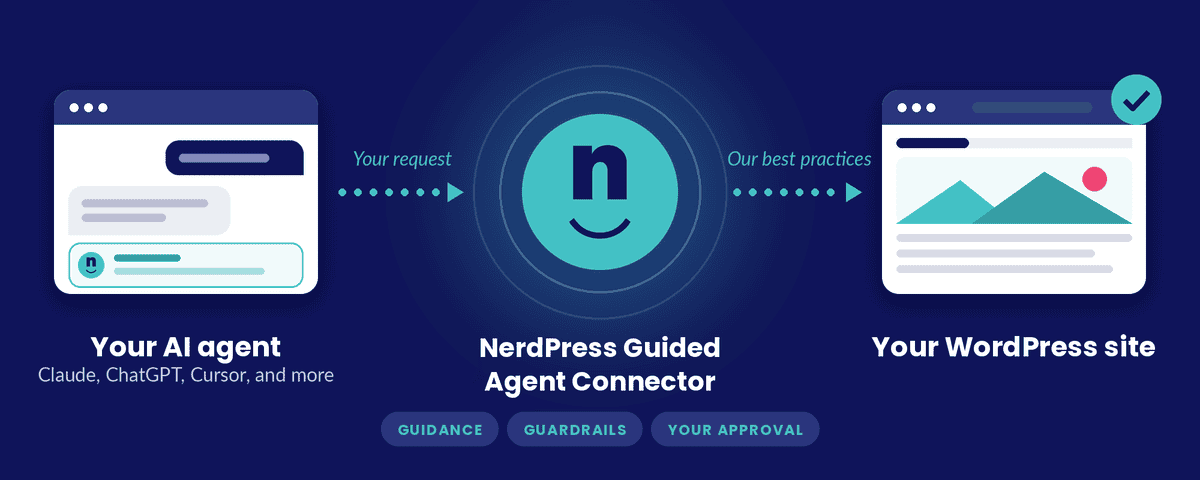
From then on, everything your agent does on your site goes through our gateway, the NerdPress part in the middle.
Before a request reaches your site, the gateway checks it against the permissions you chose and gives your agent our guidance for that kind of task. If something looks risky, it steps in with a friendly warning, a hard stop, or by waiting until you approve it. It doesn’t leave the agent to decide what’s unsafe. We make that call, and you get the final say.
The plugin then makes the change through WordPress itself but the gateway only passes things along. It doesn’t keep your prompts or your site’s content.
See it in action
Pick a task, and watch the same request go two different ways.
Along with the guidance and guardrails you just saw, you get an activity log on your site that shows every change an agent made, an Undo option for changes that can be reversed, and step-by-step procedures for common jobs.
It’s also designed to keep your agent’s token usage down.
What we’ve seen it do
We’ve had the connector in testing with a group of clients for the past couple of months, and the results have been positive. But before we tested with clients, team members volunteered to test the Connector on their own sites.
Ben used the Connector to migrate 297 recipes from one recipe plugin to another using ChatGPT and our migration procedure: back up first, convert one recipe and check it field by field, then work through the rest in verified batches.
Kari found it useful when converting otherwise thin content to robust category pages.
And Miranda used Claude to audit posts from over a decade ago that had outdated mental health crisis and warm-line numbers, then built a block pattern, and inserted it across 70 posts in about 15 minutes.
Want to try it?
We can’t wait to see how you’ll use the Connector. It’s now available to NerdPress clients. Set it up in a few minutes, or email us and we’ll help you get connected.